Types of System Software: Functions, Examples, and Features
System software is the backbone of any computing device, enabling hardware, applications, and users to work seamlessly together. It is a silent yet indispensable layer of software that works tirelessly behind the scenes to manage and optimize your computer system.
Unlike application software, which focuses on user tasks (e.g., web browsers or word processors), system software manages and optimizes computer operations in the background. From operating systems to device drivers, these programs ensure your computer runs efficiently. While some system software operates automatically, others may require advanced knowledge for configuration or troubleshooting.
In this comprehensive guide, we’ll explore the world of system software types, their functions, practical examples, and why they’re critical.
Table of Contents
What is System Software?
System software refers to a collection of programs designed to manage and control computer hardware, resources, applications, and extend the processing capabilities of a computer system. It acts as an intermediary between the user and the computer’s hardware, ensuring smooth operation. Most users don’t interact directly with system software due to its automated nature or the need for advanced technical knowledge.
Think of system software as the backbone of your computer. Without it, your hardware wouldn’t know how to communicate, your applications wouldn’t have a stable environment to execute, and you, as the user, wouldn’t be able to interact with the machine effectively.
Key Features of System Software
System software is designed with specific characteristics that enable it to perform its vital role efficiently. Some of the notable features include:
- Fast in Speed: System software is highly optimized for performance, ensuring quick execution of tasks to provide a responsive platform for higher-level applications.
- Close to the System: It interacts directly with the computer’s hardware components, often operating at a low level to manage resources effectively.
- Hard to Manipulate (Generally): Due to its critical role and low-level nature, system software is generally less user-friendly to modify or directly interact with compared to application software. Changes often require specialized knowledge.
- Smaller in Size (Compared to applications): While complex, individual system software components are often designed to be relatively small and efficient in their footprint, minimizing resource consumption.
- Essential for Operation: A computer cannot function without core system software, such as an operating system.
- Background Operation: Much of the system software operates in the background without direct user intervention, managing resources and processes silently.
Types of System Software
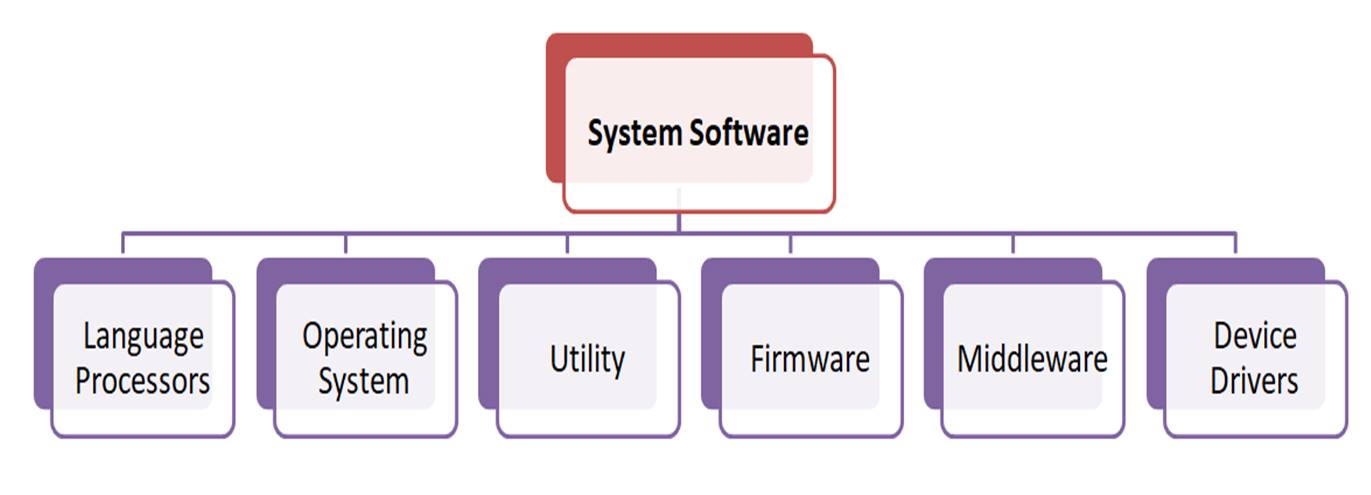
System software encompasses various specialized programs, each with distinct functions crucial for a computer’s operation. They include:
Operating System (OS)
The Operating System (OS) is arguably the most fundamental and indispensable type of system software. It’s the master control program that runs on a computer, managing all its hardware and software resources. The OS acts as the primary interface between the user, hardware devices, and other computer programs.
When you power on your computer, the operating system is the first software to load. Without it, a computer is essentially a collection of inert components. The OS performs a multitude of critical functions:
- Process Management: Manages and schedules various programs (processes) running on the computer, allocating CPU time and resources.
- Memory Management: Keeps track of primary memory (RAM) and allocates/deallocates it to processes as needed, ensuring efficient use of memory.
- File Management: Organizes, stores, retrieves, and manipulates files and folders on storage devices, providing a hierarchical file system.
- Device Management: Controls and coordinates the interaction between the CPU and peripheral devices (e.g., printers, keyboards, mouse). It allocates devices to processes and ensures smooth data transfer.
- User Interface: Provides a way for users to interact with the computer, whether through a Graphical User Interface (GUI) with icons and windows (like Windows, macOS) or a Command Line Interface (CLI) (like Linux shell).
- Security and Access Control: Implements security measures like password protection, user authentication, and file permissions to protect data and prevent unauthorized access.
- Error Handling: Detects and reports errors that may occur during system operation, providing messages for troubleshooting.
Examples of Operating Systems:
- Desktop/Laptop: Microsoft Windows (Windows 11, 10), Apple macOS, various Linux distributions (Ubuntu, Fedora)
- Mobile: Google Android, Apple iOS
- Server: Windows Server, Linux (Red Hat, Debian), UNIX
- Embedded Systems: Real-time operating systems (RTOS) in appliances, automotive systems.
Utility Software
Utility software comprises programs designed to assist in the maintenance and optimization of a computer system. They perform specific tasks to ensure the smooth, efficient, and secure operation of the computer, often enhancing system performance or providing additional functionalities not directly covered by the operating system.
Categories of Utility Software:
- Antivirus Software: Scans, detects, and removes malicious software like viruses, worms, Trojans, and spyware, protecting the computer from security threats. Examples: Avast, Norton Antivirus, McAfee, Windows Defender
- Backup Programs: Create copies of important data or the entire system, allowing for restoration in case of data loss due to hardware failure, accidental deletion, or cyberattacks. Examples: Windows Backup and Restore, Time Machine (macOS), third-party backup solutions
- File Managers: Provide tools for managing and organizing files and folders on a storage device. They allow users to open, edit, save, rename, copy, move, delete, and search for files. Examples: File Explorer (Windows), Finder (macOS), various Linux file managers
- Disk Defragmenters: Reorganize fragmented files on a hard disk drive, consolidating related file parts to improve read/write speeds and overall system performance. (Less relevant for SSDs). Examples: Windows Disk Defragmenter
- Disk Cleaners / Storage Analyzers: Identify and remove unnecessary files (temporary files, cached data, recycle bin contents) to free up disk space and improve system efficiency. Examples: Disk Cleanup (Windows), CleanMyMac (macOS), CCleaner
- Disk Partitioning Tools: Allow users to logically divide a single physical disk drive into multiple partitions, each acting as a separate drive. This can be used to install multiple operating systems or organize data. Examples: Disk Management (Windows), GParted (Linux)
- Compression Software: Reduce the size of files and folders, making them easier to store, send, and share, and saving disk space. Examples: WinZip, 7-Zip, WinRAR
- System Monitors: Provide real-time information about system resources, including CPU usage, memory consumption, disk activity, and network traffic. Examples: Task Manager (Windows), Activity Monitor (macOS)
Device Drivers
Device drivers are specialized software programs that enable the operating system to communicate with specific hardware devices connected to the computer. Every hardware component, from a printer to a graphics card, requires a driver to function correctly.
When you buy a new hardware device, it often comes with a driver (on a CD or available for download from the manufacturer’s website). You must install this driver before the device can be used with your operating system. Drivers are highly specific; a printer from one manufacturer will likely require a different driver than a printer from another, even if they perform similar functions.
The main function of device drivers is to translate OS commands into hardware-specific instructions and ensure devices function correctly with the system.
Examples of Device Drivers:
- Printer drivers
- Graphics card drivers
- Audio drivers
- Network adapter drivers
- USB device drivers
- Webcam drivers
Firmware
Firmware is a type of system software embedded directly into hardware devices, typically stored in non-volatile memory like Read-Only Memory (ROM), Flash memory, or Electrically Erasable Programmable Read-Only Memory (EEPROM). It provides low-level control for the device’s specific hardware.
Firmware gives basic instructions on how the hardware should operate and how the computer should boot up before the operating system takes over. It’s often difficult to change (though updates are sometimes available) and is crucial for the initial functionality of devices.
Examples of Firmware:
- BIOS (Basic Input/Output System) / UEFI (Unified Extensible Firmware Interface): Essential for initializing hardware components and booting the operating system in computers.
- Firmware in routers, modems, smart TVs, digital cameras, and embedded systems (e.g., in washing machines, cars).
Middleware
Middleware is a type of software that acts as a “broker” or intermediary layer, facilitating communication and data management between different applications, systems, and databases, especially those developed using different programming languages or running on different platforms.
It bridges the gap between disparate software components, allowing them to work together seamlessly. This is particularly important in distributed computing environments and enterprise applications.
Key functions of Middleware:
- Connecting front-end and back-end parts of an application.
- Integrating applications developed by different organizations or using different technologies (e.g., linking a mobile banking app with various loan providers).
- Enabling communication between applications that use different communication protocols.
- Handling data translation and formatting between incompatible systems.
Examples of Middleware:
- Application servers (e.g., Apache Tomcat, JBoss)
- Message-oriented middleware (MOM) for asynchronous communication (e.g., Apache Kafka, RabbitMQ)
- Database access middleware (e.g., JDBC, ODBC)
- Enterprise Application Integration (EAI) platforms
The Shell
In command-line-based operating systems (like UNIX or Linux), the shell acts as a command interpreter. It provides a text-based interface between the user and the operating system’s kernel (the core component of the OS).
Users interact with the shell by typing commands, which the shell then translates into instructions for the kernel to execute. The shell is typically loaded into the computer’s main memory when the system boots up.
Examples of Shells:
- Bash (Bourne Again Shell)
- Zsh (Z Shell)
- Cmd (Command Prompt in Windows, though a GUI is primary)
- PowerShell (Windows)
Boot Loaders
A boot loader is a small, essential program that helps a computer start up (boot). It’s typically stored in a specific location on a bootable storage device (like the first sector of a hard drive or a dedicated boot partition).
When the user presses the “ON” button, the computer’s firmware (BIOS/UEFI) is activated. The firmware then locates the boot loader based on the configured boot order (e.g., CD drive, USB, hard drive) and passes control to it. The boot loader’s primary function is then to load the operating system’s kernel into memory and initiate the boot process.
Examples of Boot Loaders:
- GRUB (GRand Unified Bootloader) – commonly used in Linux
- Windows Boot Manager
- LILO (Linux Loader)
Language Processors
Language processors (also known as language translators) are special types of system software designed to convert programming code written in human-readable high-level languages or assembly language into machine language (binary code) that the computer’s CPU can directly execute.
There are three main types of language processors:
- Assembler:
- Translates programs written in assembly language (a low-level language that uses mnemonics to represent machine code instructions) into machine language.
- Assembly language is very close to machine code and is specific to a particular processor architecture.
- Compiler:
- Translates an entire program written in a high-level programming language (e.g., C++, Java, Python) into machine code before the program is executed.
- The compiler reads the entire source code at once, generates an executable file (object code), and then reports all errors found during the compilation process. If errors exist, the program won’t run until they are corrected.
- Examples: GCC (for C, C++), Javac (for Java)
- Interpreter:
- Translates and executes high-level language code statement by statement (line by line).
- Unlike a compiler, it does not generate an executable file. If an error is encountered in a statement, the interpreter stops execution immediately and reports the error.
- Examples: Python interpreter, JavaScript engines in web browsers, PHP interpreter
Difference between System Software and Application Software
It is important to distinguish between system software and application software to help us understand them better. The following are some of the differences.
| Feature | System Software | Application Software |
| Purpose | Manages and operates the computer hardware and provides a platform for other software. | Helps users perform specific tasks. |
| Interaction | Primarily operates in the background, interacting directly with hardware. | Directly interacts with the user to accomplish tasks. |
| Necessity | Essential for the computer to function. | Optional; installed based on user needs. |
| User Focus | System-oriented | User-oriented |
| Dependency | Independent | Relies on system software |
| Examples | Operating Systems, Device Drivers, Utilities, Firmware, Language Processors. | Word Processors, Web Browsers, Games, Photo Editors, Email Clients. |
What is system software and its types?
System software manages computer hardware and resources. Types include operating systems, utility software, device drivers, firmware, middleware, shells, boot loaders, and language processors.
What are the functions of system software?
It manages hardware, provides a platform for applications, ensures security, and facilitates communication between software and hardware.
What are examples of system software?
Examples include Windows 11, Linux Ubuntu, Norton Antivirus, NVIDIA drivers, BIOS, Apache Tomcat, Bash, GRUB, and GCC Compiler.


